What we will learn
- Django forms
The source of this summary The first link
Working with forms
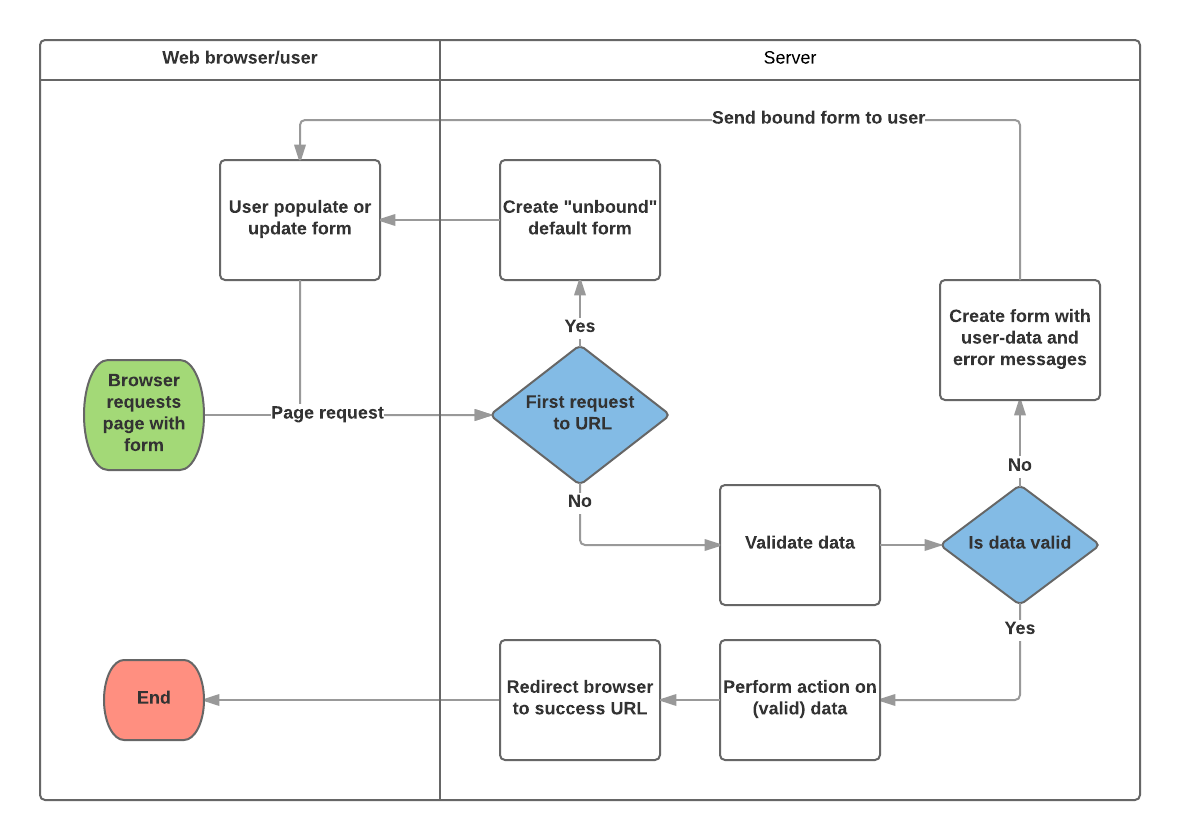
Forms are basically used for taking input from the user in some manner and using that information for logical operations on databases. For example, Registering a user by taking input as his name, email, password, etc. Django maps the fields defined in Django forms into HTML input fields
Syntax
  from django import forms

  class FormName(models.Model):
           # each field would be mapped as an input field in HTML
          field_name = models.Field(**options)
Form
The Form class is the heart of Django’s form handling system. It specifies the fields in the form, their layout, display widgets, labels, initial values, valid values, and (once validated) the error messages associated with invalid fields. The class also provides methods for rendering itself in templates using predefined formats (tables, lists, etc.) or for getting the value of any element (enabling fine-grained manual rendering).
Declaring a Form
Creating a form in Django is completely similar to creating a model, one needs to specify what fields would exist in the form and of what type.
Form fields
-
required: If True, the field may not be left blank or given a None value. Fields are required by default, so you would set required=False to allow blank values in the form.
-
label: The label to use when rendering the field in HTML. If a label is not specified, Django will create one from the field name by capitalizing the first letter and replacing underscores with spaces.
-
label_suffix: By default, a colon is displayed after the label (e.g. Renewal date:). This argument allows you to specify a different suffix containing other character(s).
-
initial: The initial value for the field when the form is displayed.
-
widget: The display widget to use.
-
help_text: Additional text that can be displayed in forms to explain how to use the field.
-
error_messages: A list of error messages for the field. You can override these with your own messages if needed.
-
validators: A list of functions that will be called on the field when it is validated.
-
localize: Enables the localization of form data input.
-
disabled: The field is displayed but its value cannot be edited if this is True. The default is False.
URL configuration
urlpatterns += [
path('book/<uuid:pk>/renew/', views.renew_book_librarian, name='renew-book-librarian'),
  ]